
Robertson AV Guides
Laser vs Lamp Projectors: Total Cost of Ownership
By Robertson AV ·
A lamp projector almost always wins on the purchase order. A laser projector often wins on everything that happens after it. When schools, churches and businesses compare a laser vs lamp projector, the price gap is obvious on day one, while the replacement lamps, filter checks, ladder time and dark rooms that follow are spread across five years of facilities tickets. This guide puts those costs on one page, with a worked example you can rerun using your own hours and prices.
Laser vs lamp projector: what the ratings mean
A lamp projector uses a high-pressure lamp that wears out and gets replaced. A laser projector uses a solid-state light source designed to last the life of the projector. The headline numbers look simple, but they need a careful read.
For a real example of lamp life, Epson’s lamp specifications for the PowerLite 119W list up to about 8,000 hours in High power mode, 10,000 in Medium and 17,000 in ECO. On the laser side, Epson rates its laser projector range at up to 20,000 hours of estimated life in Normal mode. Three details change how you should use those figures:
- Ratings are “up to” and depend on the mode. A lamp in ECO lasts longer partly because it runs dimmer. ProjectorCentral’s guide to school projector total cost of ownership recommends planning with the full-power rating, warning that Eco can turn a 4,000-lumen projector into one that barely reaches 2,000 lumens.
- Laser life is a brightness milestone, not a failure date. Epson’s Singapore laser projector page defines its 20,000-hour figure as the approximate time until brightness falls 50% from first use, and notes that other parts may need replacing sooner.
- Lamps fade before they fail. Epson’s lamp spec notes that brightness decreases over time, and the same ProjectorCentral article says lamps are typically rated for 5,000 hours, but most start yellowing and losing brightness around 2,500 hours.
The five cost buckets
1. Purchase price
Laser models still cost more. ProjectorCentral’s business projector buying guide notes that they carry a noticeable premium over an equally bright lamp model of the same resolution, although laser prices have been dropping year to year. Quote both versions at the same brightness and resolution. The difference between those two quotes is the number every other bucket has to beat.
2. Replacement lamps
ProjectorCentral’s formula is the cleanest way to price lamps:
Annual lamp cost = hours used per year × lamp price ÷ expected lamp life
Lamp prices vary by model. The same article puts typical replacement lamps between $100 and $350 and suggests schools keep about one spare for every 20 projectors. Use the actual price of the genuine lamp for your model, not a guess.
3. Filters and cleaning
LCD-based projectors need periodic dust filter maintenance. For the 119W, Epson’s air filter guidance says to clean the filter and vents when they get dusty or when the projector shows a cleaning message, and to replace the filter if it is damaged or the message persists after cleaning. ProjectorCentral suggests examining, cleaning or replacing the filter every year. Laser models are not automatically filter-free: the buying guide notes that some use sealed designs with no filter, while others still need cleaning. Check each spec sheet.
4. Labor and access
Every lamp change is a work order: order the part, receive it, schedule access, bring a ladder or lift, swap the lamp, reset the lamp timer and test. A projector over a conference table might take minutes. One above raked seating or a sanctuary ceiling can mean a lift rental and an after-hours visit.
5. Downtime
A lamp that dies mid-lesson or mid-service costs more than the lamp. Laser also removes the lamp warm-up wait, a point Epson’s Singapore laser page makes directly: no waiting for the lamp to warm up. Downtime is hard to price, so give it an explicit number, such as the cost of a cancelled training session, and include it.
Electricity belongs in the model too. Compare the rated power consumption on both spec sheets, then multiply by your hours and utility rate.
A worked 5-year example
The figures below are assumptions for illustration, not quotes or market data. Swap in your own numbers.
| Input | Value used | Why |
|---|---|---|
| Planned lamp life | 5,000 hours | A common full-power rating; check your model |
| Lamp price | $200 (example) | Inside the $100 to $350 range cited above |
| Labor per lamp change | $75 (example) | For example, 1.5 hours at $50/hour |
| Filter per lamp change | $25 (example) | Assumes a new filter at each lamp change |
| Laser light source | 20,000 hours to 50% brightness | Epson rating; no swaps in most scenarios |
| Annual filter checks | Same for both | Excluded, since they cancel out |
That makes each lamp change $300 in this example. Now apply it to four room profiles:
| Room profile | Daily use | 5-year hours | Lamp changes | Example lamp-side cost |
|---|---|---|---|---|
| Small meeting room | 2 h × 250 days | 2,500 | 0 | $0 |
| Classroom | 6 h × 180 days | 5,400 | 1 | $300 |
| Training or multipurpose room | 10 h × 250 days | 12,500 | 2 | $600 |
| Lobby or signage | 12 h × 365 days | 21,900 | 4 | $1,200 |
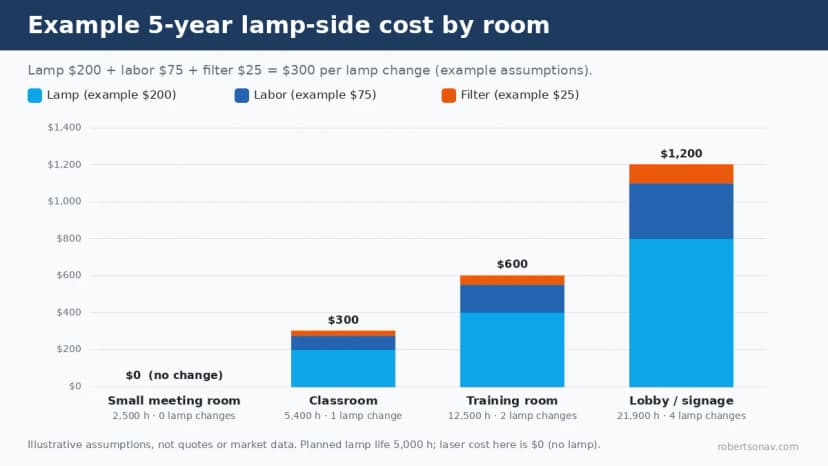
How to read the result: if the laser premium for the classroom projector is under $300, laser comes out ahead by year five before you count any downtime. In the small meeting room, the lamp model wins on cost unless the room is hard to reach or the projector stays in service well past five years. Multiply by your fleet, too. Forty classrooms on the classroom profile means 40 lamp changes and $12,000 in this example, plus 40 interruptions.
The signage row carries a caution. At 21,900 hours, even the laser would pass its 20,000-hour half-brightness rating in year five. High-duty rooms need enough brightness headroom for either technology, which our projector lumens guide by room size helps you size.
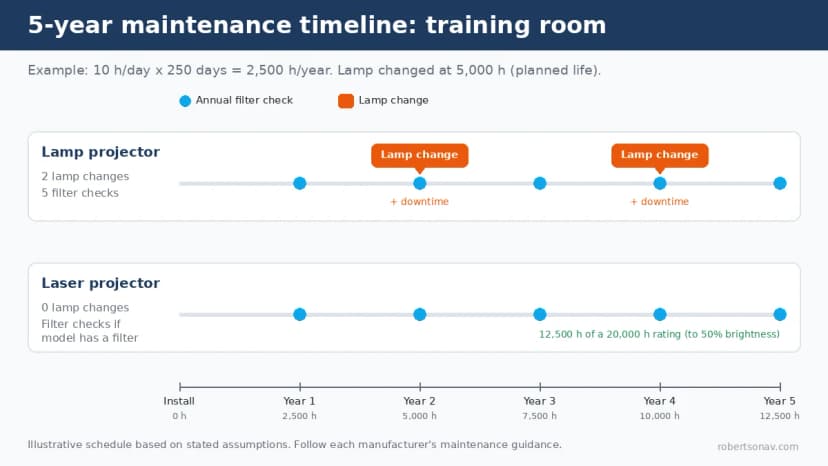
Run the ECO case as well. At the 119W’s ECO rating, the classroom profile would need no lamp change in five years, but at reduced brightness. If the room still looks good in ECO, the lamp math improves considerably.
When a lamp projector still makes sense
- Low annual hours. A room used a couple of hours a week may never need a lamp.
- Short planning horizon. If the room is being remodeled or the projector replaced in a few years, upfront price dominates.
- Easy access. A table-height or low-ceiling mount keeps labor near zero.
- Tight upfront budgets. When the capital line is fixed, a lamp model can get a working room today.
For a lamp model that fits everyday presentation rooms, our Epson PowerLite 119W room-planning checklist covers the screen, mount and source decisions.
When laser pays off
- High hours. Classrooms, training rooms, houses of worship with weekday programs and signage rack up hours fast.
- Hard-to-reach mounts. Every avoided lift visit is real money.
- Downtime-sensitive rooms. Services, lectures and live events can’t wait for a lamp.
- Fleets. One model, no lamp inventory, and fewer work orders across a campus.
The same trade-off appears in home cinema. Our Epson 4K PRO-UHD explainer compares a lamp model with three laser models.
How to run the numbers for your rooms
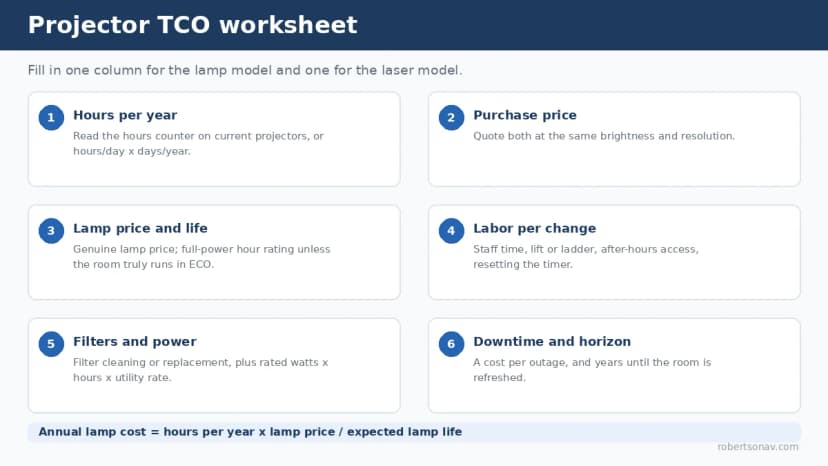
- Log real hours. Read the lamp or operating-hours counter on existing projectors.
- Quote both options at the same brightness and resolution.
- Price the genuine replacement lamp and filter for the exact lamp model.
- Estimate labor per change, including lifts and after-hours access.
- Put a number on downtime.
- Pick a planning horizon that matches your refresh cycle.
If you are replacing a lamp projector with a laser model, recheck the mount position as well. Throw ratios differ between models, and our projector throw distance guide shows how.
Robertson AV can quote lamp and laser options side by side so the comparison starts from real prices. Shipping is free on all RobertsonAV orders within the United States, including oversized and heavy items. Orders shipping outside Florida carry no sales tax, and Florida orders are taxed unless you submit a tax-exemption certificate. We accept purchase orders, and net terms are available for eligible partners. Browse our projectors, or send your room list and usage hours through our quote request page.
FAQ
Is a laser projector cheaper than a lamp projector in the long run?
It depends on hours. The more hours a room runs and the harder the projector is to reach, the sooner the laser’s higher price is offset by avoided lamp changes, labor and downtime. In low-use rooms, a lamp model can stay cheaper.
How long does a projector lamp last?
It varies by model and mode. Epson lists the PowerLite 119W lamp at up to about 8,000 hours in High mode and 17,000 in ECO. Brightness drops as a lamp ages, so plan with the full-power rating.
How long does a laser projector last?
Epson rates its laser projectors at up to 20,000 hours in Normal mode, defined as the approximate time until brightness falls 50% from first use.
Do laser projectors need filter changes?
Some use sealed designs with no filter, and others still have a filter to clean. Check the spec sheet for each model.
How do I calculate annual lamp cost?
Multiply the hours used per year by the lamp price, then divide by the expected lamp life. Use the full-power lamp rating unless the room will truly run in ECO.
Does ECO mode change the comparison?
Yes. ECO can extend lamp life substantially but reduces brightness, so only count ECO hours if the image still works in the room.