
Robertson AV Guides
Native 4K vs Pixel-Shift 4K: Does It Matter?
By Robertson AV ·

“Is it real 4K?” comes up on almost every home theater and boardroom projector quote we price. The honest answer is that it depends on two things the spec sheet doesn’t show: how far your seats are from the screen, and what you put on it. This guide explains how native 4K and pixel-shift 4K projectors build an image, what the human eye can actually resolve at typical seating distances, and when paying extra for a native 4K imager is worth it.
Native 4K vs pixel shift: what’s different
A native 4K projector has an imaging chip (or three) with a full 3840 x 2160 grid, about 8.29 million pixels. Each pixel in a 4K signal maps one-to-one to a physical pixel on the imager.
A pixel-shift projector uses a lower-resolution imager and moves the image by a fraction of a pixel many times per second. Each video frame is split into sub-frames, and each sub-frame lands in a slightly different position. Your eye blends them into one image with more distinct pixel positions than the chip physically has.
Not all pixel shift is equal
ProjectorCentral’s explainer on whether 4K DLP chips are really 4K describes the two main approaches:
- Two-position shift on 1080p panels. A 1920 x 1080 image is projected, then a second 1920 x 1080 image is shifted diagonally and overlaid on the first. That gives about 4.15 million addressable pixels, half of a native 4K signal. Epson’s 3LCD 4K PRO-UHD projectors work this way.
- DLP XPR shifting. Texas Instruments’ 0.66-inch chip has 2716 x 1528 mirrors and uses two-phase shifting to put 8.3 million pixels on screen. ProjectorCentral notes this process produces independent single-pixel structures, which the 3LCD two-position process does not.
Epson describes its approach directly. Its 4K PRO-UHD technology page says the projector accepts 4K UHD content, upscales non-4K content, and shifts each pixel diagonally by 0.5 pixels to double Full HD resolution. Its footnote also says resolution is Full HD in 3D mode. For a model-by-model look at Epson’s line, see our guide to Epson 4K PRO-UHD projectors.

What the eye can actually resolve
Pixel counts only matter if your eye can see the difference. The standard reference here is ITU-R Recommendation BT.1845, used by broadcasters to relate resolution, screen size and viewing distance. It takes the typical minimum angular resolution of human vision as 1 arc-minute (1/60 of a degree) and defines the optimal viewing distance as the point where one pixel of the source image subtends that angle.
Because the rule is an angle, the distances scale with screen height (H). BT.1845 lists:
- 1920 x 1080: optimal viewing distance of 3.2H
- 3840 x 2160: optimal viewing distance of 1.6H
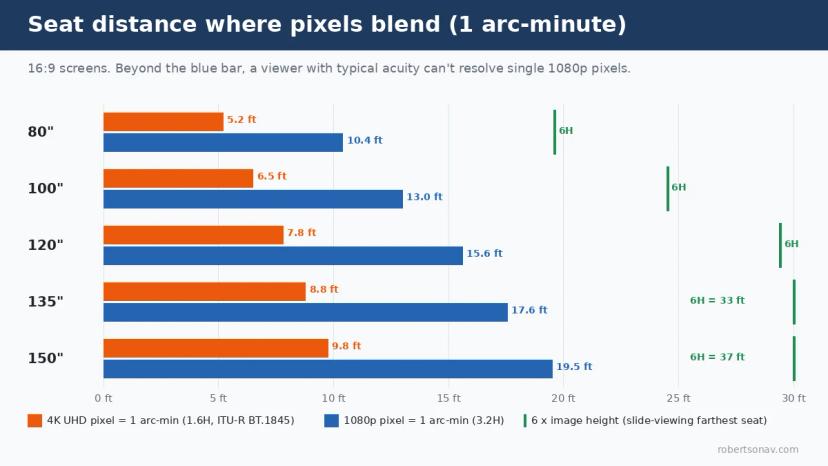
In plain terms: sit farther than about 3.2 image heights away and a viewer with typical acuity can’t pick out individual 1080p pixels, so adding pixels has little visible effect. Sit between 1.6H and 3.2H and the extra detail of 4K becomes resolvable. Sit closer than 1.6H and even 4K pixels approach the limit of what the eye can separate.
A 16:9 screen’s height is about 0.49 times its diagonal, so these distances are easy to work out. For a 100-inch screen (about 49 inches tall), the 1080p threshold is about 13 feet and the 4K threshold about 6.5 feet. For a 120-inch screen, they’re about 15.6 and 7.8 feet.
Caveats worth knowing
One arc-minute is a typical value, not a hard wall. BT.1845 says it holds within a rather wide range of contrast and brightness, and that it applies to static images, since moving images can look blurred because of display motion handling and the eye’s limited ability to track movement. Viewers with sharper-than-typical vision can resolve finer detail, and high-contrast edges such as text and thin lines reveal resolution differences more readily than film content.
What this means at real seating distances
Conference rooms, classrooms and lecture halls
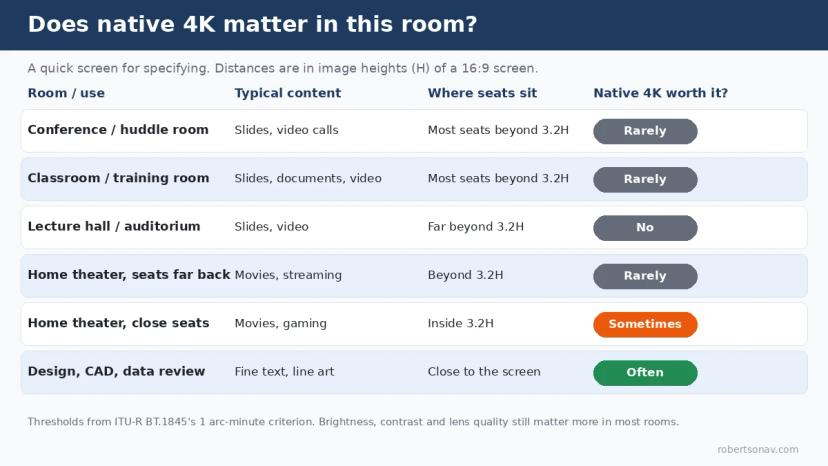
Business and education rooms are usually sized for the farthest viewer. As our screen size and seating distance guide explains, the long-standing 4/6/8 rule puts that viewer at 4, 6 or 8 times image height depending on the content. All three are beyond the 3.2H point where 1080p pixels already blend. Front-row seats may sit closer, but for most of the audience a pixel-shift projector fed a clean 4K signal will look as sharp as a native 4K model.
In these rooms, money is usually better spent on brightness, contrast and screen choice. Our projector lumens guide covers how much light a room needs, and a projector that’s too dim will look worse than any resolution difference.
Home theaters
Home theaters are where the question gets interesting, because seats are often closer relative to a large screen. If your main seats are inside about 3.2H, you’re in the zone where extra resolution can be seen. Even then, ProjectorCentral’s 4K projector tracker notes that with native 4K video, such as a 4K Blu-ray, it’s often difficult to tell pixel-shift 3LCD and e-shift projectors from native 4K models side by side, and that with standard 1080p video there’s no practical difference in upscaling.
Text, CAD and data
The same tracker says the native 4K advantage becomes more apparent with complex graphics, data-based text and financial documents. That matters in design review rooms, engineering spaces, control rooms and any space where people inspect fine line work up close. If your users read small spreadsheet cells or CAD drawings from close seats, native 4K (or a pixel-shift system that addresses the full 8.3 million positions) is the safer specification.
Installation details that affect the choice
Pixel shift is a processing feature, and on some installation projectors it interacts with other settings. In the user’s guide for one Epson projector, the 4K Enhancement instructions recommend turning the feature off when projecting from computers or multiple projectors, and note that enabling it cancels Edge Blending, Scale, Curved Surface, Point Correction and Corner Wall adjustments. If a design depends on edge blending or geometric correction, check how the chosen model handles pixel shift before you commit.
Also remember that resolution on screen is only as good as the setup. A projector tilted and corrected with heavy keystone gives up effective resolution, and a soft focus wipes out any 4K advantage. Plan placement with our throw distance guide so the lens, not digital correction, does the work.
How to decide
- Measure image height and the distance to your main seats, then express it in image heights.
- If most seats are beyond about 3.2H and the content is video or slides, pixel shift is a sound choice. Spend the difference on brightness, contrast or the screen.
- If key seats are inside 3.2H, or users read fine text and line art, give native 4K or full 8.3-million-position shifting serious weight.
- Check edge blending, warping and 3D needs against the projector’s documentation.
- Whenever possible, judge sharpness from the actual seats with your own content.
FAQ
Is pixel-shift 4K “real” 4K?
It accepts a 4K signal and puts more detail on screen than a 1080p projector, but it isn’t native 4K. Two-position 1080p shifting addresses about 4.15 million pixel positions, while some DLP shifting systems address the full 8.3 million. Whether you can see the difference depends mostly on seating distance and content.
How close do I need to sit to see the difference between 1080p and 4K?
Using the 1 arc-minute criterion in ITU-R BT.1845, inside about 3.2 times the image height. For a 100-inch 16:9 screen that’s roughly 13 feet.
Does pixel shift add lag or noise?
Pixel shift relies on components that move the optical path. ProjectorCentral’s resolution shootout notes this can add a slight increase in noise or vibration that’s usually hidden by the cooling fan. For gaming, check the specific model’s published input lag rather than assuming either type is faster.
Should a conference room get a native 4K projector?
Usually not for resolution alone. Most seats sit far enough back that 1080p-class detail is at the eye’s limit. Brightness, contrast and image size typically matter more.
Can RobertsonAV help me choose?
Yes. Send your room dimensions, seating distances, screen size and main content through a quote request, or browse our projectors. Shipping is free on all RobertsonAV orders within the United States, and if your organization buys on purchase orders, our guide to buying AV equipment with a purchase order explains the process.