
Robertson AV Guides
Projector Screen Size and Seating Distance Guide
By Robertson AV ·

Screen size is the decision that drives everything else on a projection quote. It sets how bright the projector has to be, where it mounts, and whether the people in the back row can actually read the slide. Yet it is often picked last, from whatever fits between the ceiling and the whiteboard. This guide shows how integrators size a screen from the seats outward: the farthest viewer, the closest viewer, and the content on the wall.
Start from the seats, not the wall
Two seats define a good image: the farthest viewer, who needs the image large enough to read, and the closest viewer, who needs it small enough to take in without craning. Everything between those two positions is the usable viewing area.
Measure both from the screen surface, in the same units. Then decide what people will look at most of the time. A video-heavy lobby and a finance team reading spreadsheets need very different image sizes in the same room.
The 4/6/8 rule, explained
For decades, AV designers used a simple rule of thumb that ties the farthest seat to image height (not diagonal):
- 4 × image height for detailed viewing, such as drawings, fine data, or small text the viewer must inspect.
- 6 × image height for reading documents and presentation slides.
- 8 × image height for video and general viewing where nobody needs to read small text.
So if the farthest seat is 24 feet away and the room shows slides, the image should be at least 24 ÷ 6 = 4 feet (48 inches) tall.
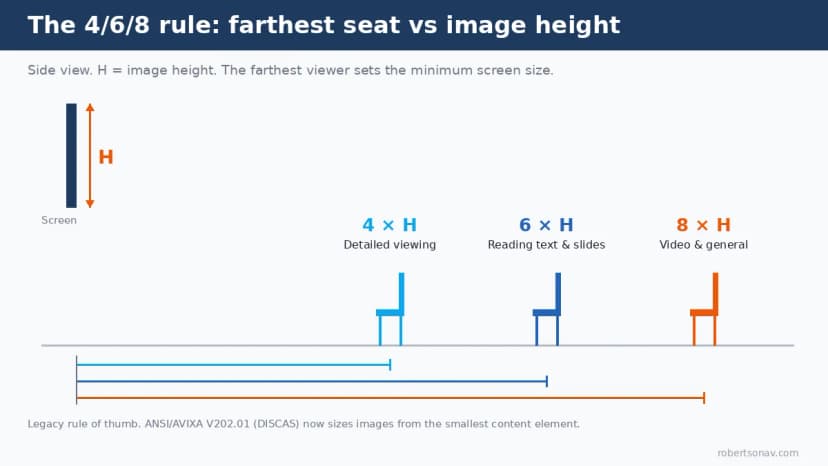
The rule is still useful for a quick sanity check, but the industry standard has moved on. AVIXA’s Display Image Size for 2D Content standard (ANSI/AVIXA V202.01, known as DISCAS) sizes the image from the smallest element viewers must read, expressed as a percentage of image height. AVIXA’s own explanation of display size terms covers the closest and farthest viewer definitions, and its DISCAS calculators handle two categories: Basic Decision Making (general presentations) and Analytical Decision Making (fine detail). The 4/6/8 factors line up with content elements of roughly 2%, 3%, and 4% of image height, which is why the old rule still lands close for typical slides.
Convert image height to a screen size
Screens and displays are sold by diagonal, so convert once you know the minimum height:
| Aspect ratio | Image height ≈ | Image width ≈ |
|---|---|---|
| 16:9 | diagonal × 0.49 | diagonal × 0.87 |
| 16:10 | diagonal × 0.53 | diagonal × 0.85 |
| 4:3 | diagonal × 0.60 | diagonal × 0.80 |
Working backward for 16:9, minimum diagonal ≈ minimum height ÷ 0.49. A 48-inch-tall image needs about a 98-inch 16:9 screen, so a 100-inch screen is the practical pick.
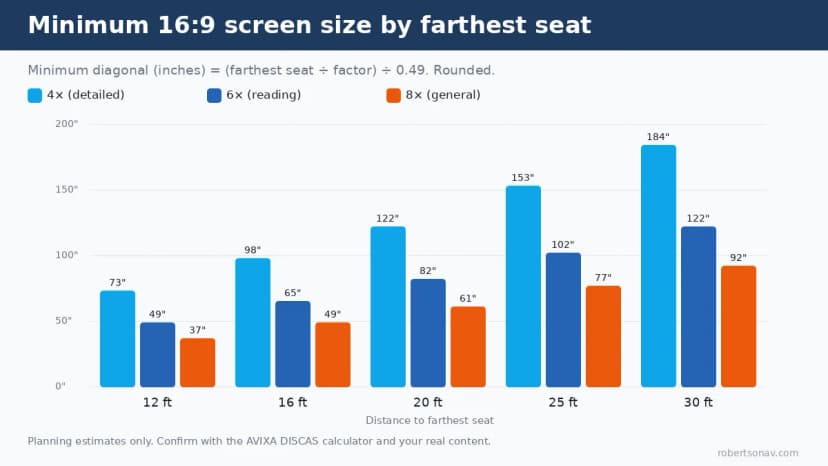
Two things jump out of that chart. First, deep rooms that need detailed viewing quickly call for screens larger than any flat panel, which is where projection earns its place. Second, a 16:10 screen gives you more height at the same width, which helps spreadsheet-heavy rooms.
Don’t forget the closest seat
Bigger is not automatically better. If the front row sits too close, viewers tilt their heads to see the top of the image and scan side to side to read a line of text.
In the DISCAS Basic Decision Making method, the closest viewer is set so the top of the image sits no more than about 30 degrees above eye level. AVIXA’s CTS prep material on DISCAS works this out as roughly 1.732 × (image height + offset), where the offset is how far the bottom of the image sits above seated eye level. With the bottom of the image near eye level, that is about 1.7 times the image height. For a 100-inch 16:9 screen (about 49 inches tall), the first row should be at least seven feet back, and more if the screen is mounted high.
Screen height on the wall matters just as much. In rooms with more than one row, raise the bottom of the image enough to clear the heads in front, then recheck the closest-seat angle. That trade-off is why lecture halls use raked seating.
Worked examples
These are planning numbers. Always confirm against the actual furniture plan and content.
Training room or classroom, farthest seat about 28 feet. At 6 × image height, the image needs to be about 56 inches tall, or roughly a 114-inch 16:9 diagonal. That is beyond any common flat panel, which is why many deep classrooms still project. If the room is shallower, our ultra short throw vs flat panel guide walks through the trade-offs.
Conference room with a 20-foot table. If the far end of the table is about 22 feet from the screen, 6 × height gives roughly 44 inches of image height, or about a 90-inch 16:9 diagonal. A 100-inch projection screen covers it with margin. An 86-inch display would come up a little short for slide reading from the far chair, a point we cover in our commercial display vs consumer TV checklist.
Mid-size meeting room, farthest seat 16 feet. At 6 ×, a 65-inch 16:9 image is the minimum. For mostly video calls, 8 × allows about 49 inches, but most rooms share slides, so size for reading.
The same AVIXA training example sized a room with a farthest viewer at 215 inches and 3% text at a minimum image height of about 36 inches, or roughly a 73-inch 16:9 display. That matches 215 ÷ 6, which shows how closely the old rule tracks the standard for ordinary presentation content.
Home theater: size by viewing angle
Home cinema uses a different yardstick. Instead of reading distance, designers size the screen by how much of your horizontal field of view it fills from the main seat. The figures most often cited are 30 degrees, from SMPTE guidance, as a comfortable minimum, and 36 degrees, from THX, as an immersive target, with about 40 degrees as a practical upper limit.
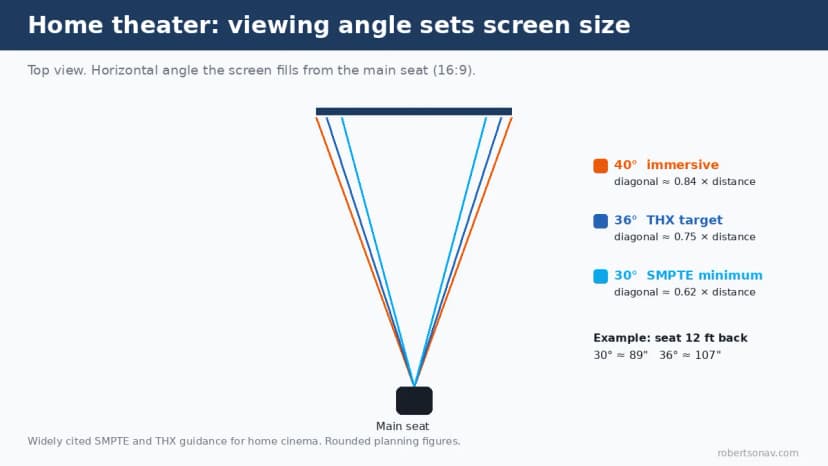
For 16:9, that works out to a screen diagonal of about 0.62 × seating distance at 30 degrees and 0.75 × seating distance at 36 degrees. A main seat 12 feet (144 inches) back suits a screen between about 89 and 107 inches. Native 4K and pixel-shift projectors let you sit closer before pixel structure shows, which is part of the case we make in our Epson 4K PRO-UHD explainer.
Screen size changes brightness and throw
Once the screen size is locked, two other numbers move with it:
- Brightness. The same projector spread over a larger screen looks dimmer. Going from a 100-inch to a 120-inch 16:9 image increases screen area by about 44%. Check the new size against our projector lumens guide by room size.
- Throw distance. A wider image needs the projector farther from the screen at the same throw ratio. Rerun the numbers in our projector throw distance guide before the mount location is set.
For a typical 100-inch classroom install, our Epson PowerLite 119W room-planning checklist shows how screen size, brightness, and mounting fit together on one drawing.
Common screen-sizing mistakes
- Sizing from the wall instead of the seats. The space between the ceiling and the whiteboard is a constraint, not a design target.
- Using diagonal in the 4/6/8 math. The rule uses image height. On 16:9, height is only about half the diagonal.
- Ignoring content. Dense spreadsheets need a bigger image than video. Ask what the room will actually show.
- Mounting too low. In multi-row rooms, the bottom of the image disappears behind heads.
- Forgetting the front row. An oversized screen in a shallow room is uncomfortable to watch.
If you share the room dimensions, the seating layout, and what will be on screen, we can check screen size, brightness, and throw together through our quote request page.
FAQ
How do I choose a projector screen size for my room?
Measure the distance to the farthest seat and divide by 6 for slides (4 for detailed content, 8 for video) to get the minimum image height. Divide that height by 0.49 to get the 16:9 diagonal.
What is the 4/6/8 rule for screens?
A legacy AV rule of thumb: the farthest viewer should be no more than 4, 6, or 8 times the image height away, depending on whether the content is detailed, text and slides, or general video.
How close should the front row be to a projector screen?
For presentation rooms, about 1.7 times the image height when the bottom of the image is near seated eye level, and farther if the screen is mounted higher. For a 100-inch 16:9 screen, that is roughly seven feet.
What size screen do I need if I sit 12 feet away in a home theater?
Roughly 89 to 107 inches for 16:9, based on the commonly cited 30-degree SMPTE and 36-degree THX viewing angles.
Is 16:9 or 16:10 better for a conference room?
16:9 matches most video content and many laptop outputs. 16:10 gives a little more height at the same width, which helps with documents and spreadsheets. Match the screen to the projector’s native aspect ratio.
Does a bigger screen need a brighter projector?
Yes. Image brightness falls as screen area grows, so recheck lumens whenever the screen size goes up.