
Robertson AV Guides
Ceiling vs Table Microphones: Choosing a Conference Room Microphone
By Robertson AV ·
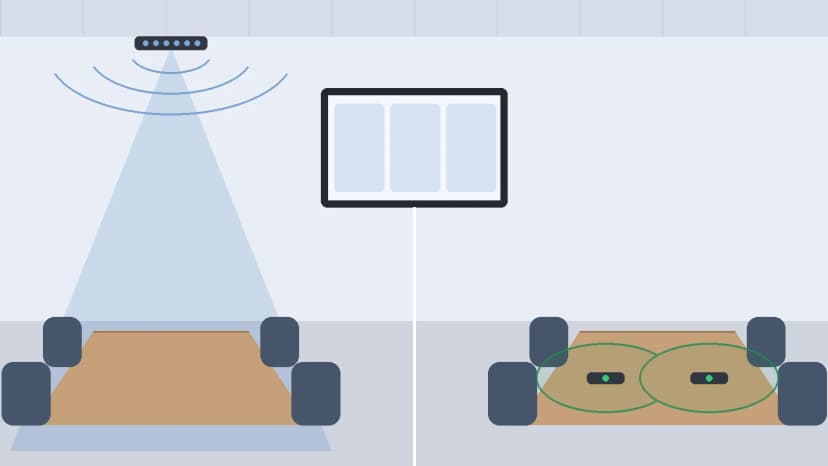
Remote participants forgive a soft video image long before they forgive bad audio. If they can’t hear the person at the far end of the table, the meeting fails. That makes the conference room microphone the most important audio choice in a hybrid room. The usual question is whether to put microphones in the ceiling or on the table. Both work when they suit the room. Here are the trade-offs integrators weigh: coverage, pickup distance, acoustics, aesthetics, and the processing and cabling behind the mics.
Start with coverage: every seat, no gaps
Microsoft’s Teams Rooms planning guidance puts it plainly: microphone and speaker coverage must include every seat in the room without leaving gaps. Its device selection guidance for hybrid meetings adds two practical rules:
- Spacing. At least one microphone should be within 7.5 feet (2.3 meters) of each participant, unless the manufacturer specifies something different.
- Overlap. When a room needs several microphones, their coverage areas should overlap so no one falls into a gap.
The same guidance notes that a large conference table might need two or more microphones. A room with a central table and secondary seating might need microphones both on the table and in the ceiling for people who aren’t sitting at it.
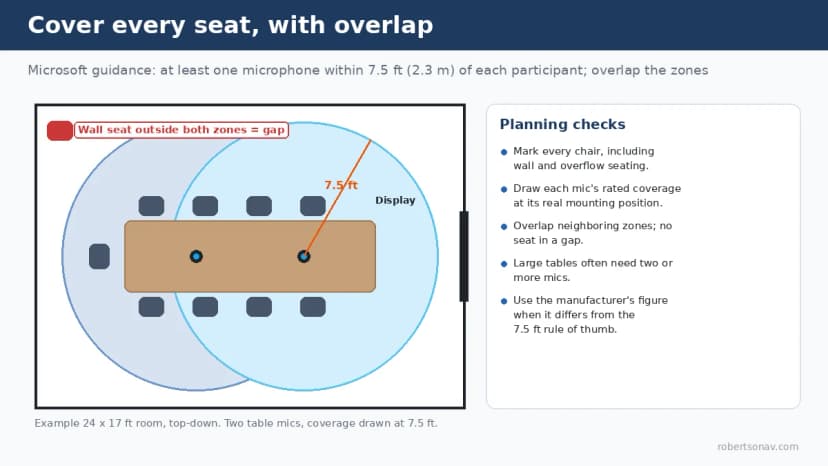
Sketch the room first: the table, every chair (including wall seating), the display wall and the ceiling height. Then draw each candidate microphone’s rated coverage on it. Any seat outside a zone is a call that will go badly.
How table microphones work in practice
Strengths
A tabletop microphone sits close to the talker, often within an arm’s length. Distance matters more than almost anything else in voice pickup. In open space, direct sound drops by about 6 dB each time the distance doubles, while the room’s reflected sound stays roughly the same. So a closer microphone captures more voice relative to room reverberation, HVAC noise and keyboard clatter.
That makes table mics a strong fit when:
- The ceiling is high, open or exposed, so there’s no grid to mount into.
- The room is acoustically live (hard walls, glass, bare floors) and you need every bit of direct-to-reflected advantage.
- The table layout is fixed and people always sit at it.
- The budget favors a simple USB kit over a ceiling installation.
Weaknesses
Table mics live where people put coffee cups, laptops and papers. They get moved, covered or knocked. Cables have to reach them, so plan floor boxes, table grommets or cable channels from the start instead of running cords across the carpet. In rooms that are rearranged often, the mics may end up far from the people they’re meant to cover.
How ceiling microphones work in practice
Beamforming arrays
Modern ceiling microphones are usually arrays: many small capsules in one panel, steered by digital signal processing to form pickup beams or zones. Microsoft’s guidance for Signature Teams Boardrooms recommends beamforming ceiling microphones “for precise voice capture across the room, regardless of head orientation or posture,” and pairing them with distributed speakers. The same guidance says ceiling microphones and speakers should be mounted between 9 and 12 ft from the floor, and that ceiling arrays with DSP are recommended for effective echo cancellation and clear voice pickup.
Strengths
- Clean tables. Nothing to move, cover or unplug. Microsoft notes that in-ceiling microphones and speakers are a great option to remove clutter from the table and provide better room coverage.
- Flexible layouts. Coverage follows the ceiling grid, not the furniture, so it suits rooms that are reconfigured or have seating away from the table.
- Tamper resistance. Ceiling hardware is harder to unplug or walk off with.
Weaknesses
The talker is farther away. A seated person’s mouth is typically several feet below a ceiling array, so the room’s acoustics show up more in the pickup. A ceiling array in an untreated room with hard surfaces will usually sound more distant than a table mic in the same room.
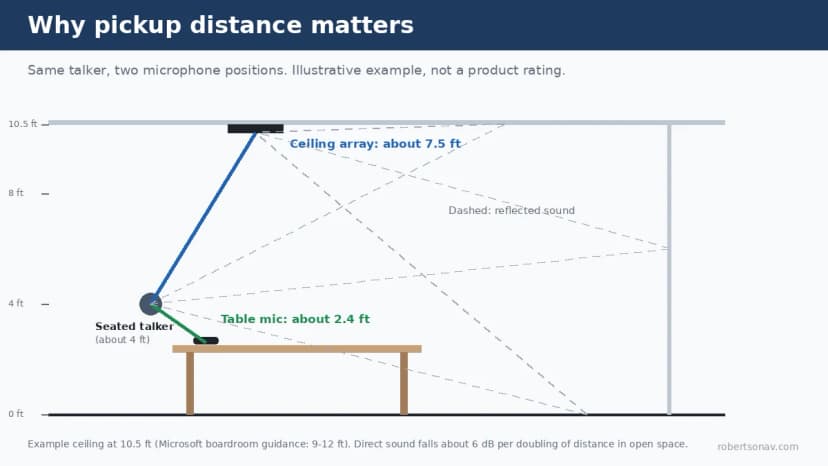
Ceiling type matters too. A drop-tile grid makes mounting easy; open ceilings usually need a pendant or suspension kit, and very high ceilings can exceed the array’s rated height. Always check the manufacturer’s coverage figures at your actual mounting height.
Room acoustics: the hidden variable
Reverberation is the sound that keeps bouncing around after someone stops talking. Acousticians describe it with reverberation time, often written RT60: how long it takes sound in the room to decay by 60 dB. Glass, drywall and bare floors lengthen it; carpet, acoustic tiles and wall panels shorten it.
Microsoft’s room guidance warns that poor acoustics can lead to echo, reverberation and reduced speech intelligibility. Its recommendations for some room types include acoustically treating at least two walls, carpeting or treating the floor, and using sound-absorbing ceiling tiles in high-ceiling spaces.
The practical rule: the more reverberant the room, the more a close microphone helps. If a live room must have ceiling mics, budget for acoustic treatment too, because no DSP setting fully removes reverberation once it’s in the signal.
The processing behind the microphones
DSP and acoustic echo cancellation
Whatever microphones you choose, a DSP does the cleanup. The key function is acoustic echo cancellation (AEC). It removes the far-end audio that comes out of the room speakers and gets picked up again by the microphones, so remote participants don’t hear themselves. Noise reduction and automatic gain control even out near and far talkers. In all-in-one kits and video bars the DSP is built in. In larger rooms it may be a dedicated processor or software running on the network.
USB, PoE and networked audio
Smaller rooms usually connect microphones and speakers to the room PC over USB, either directly or through a DSP. Larger systems increasingly use networked audio. Ceiling arrays are often powered by Power over Ethernet (PoE), and many carry audio over the same network cable using a protocol such as Dante. That cuts cabling but puts audio on the corporate network, so involve IT early on VLANs, switch capacity and PoE budget.
Camera integration
Some ceiling arrays and DSPs can share the active talker’s position with a tracking camera, so the camera switches to the person speaking. If you want speaker tracking, confirm the microphone, DSP and camera work together before finalizing the design.
For help choosing the camera itself, see our conference room camera buying guide.
Aesthetics and installation
Architects and facilities teams often prefer ceiling arrays because they disappear into the grid. Table mics can look neat too, with low-profile units and cabling routed through the table, but not with cords trailing across the floor.
Plan the cable path either way. For table mics, coordinate with the furniture vendor on grommets, power and data. For ceiling mics, check plenum requirements, mounting support and network drops before the ceiling closes. For the rest of the room, our huddle room AV setup checklist walks through displays, cameras and BYOD connections.
Choosing between ceiling and table microphones
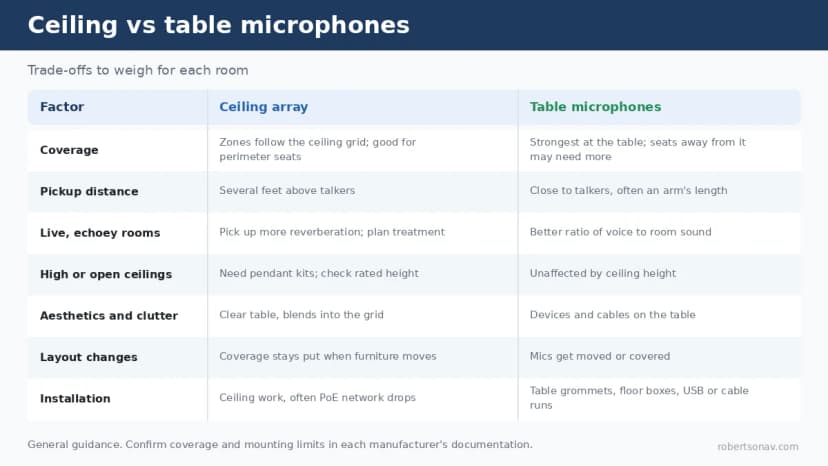
- Small huddle rooms: a video bar’s built-in microphones are often enough when every seat is within its rated range.
- Medium rooms with a fixed table: one or two table mics extend coverage to the far end of the table.
- Boardrooms, rooms with perimeter seating or rooms that get rearranged: beamforming ceiling arrays with DSP, plus acoustic treatment where needed.
- High, open or very live rooms: table mics, or a hybrid design with both.
Choose components from your meeting platform’s certified list. For Teams, that’s Microsoft’s certified systems and peripherals. Once installed, test every seat with a real call.
Get the room quoted
Send us the room sketch: dimensions, ceiling height and type, seat count, the meeting platform and the display you plan to use. Our guide on how to request an AV quote that gets approved shows what to include. If the display is still undecided, see our commercial display vs consumer TV checklist. Shipping is free on all RobertsonAV orders within the United States, including oversized and heavy items. Orders shipped outside Florida aren’t charged sales tax; Florida orders are taxed unless the buyer submits a valid tax-exemption certificate, which tax-exempt buyers submit by logging in to their RobertsonAV account. Purchase orders are accepted against a formal quote, as explained in our guide to buying AV equipment with a purchase order. Net terms are available for eligible partners. Browse our video conferencing equipment and audio, or send your room details through our quote request page.
FAQ
Are ceiling microphones better than table microphones?
Not universally. Ceiling arrays keep tables clear and suit flexible layouts; table mics sit closer to the talker and cope better with high ceilings or live rooms.
How many microphones does a conference room need?
Enough that every seat is covered with overlapping zones. Microsoft suggests at least one microphone within 7.5 feet (2.3 meters) of each participant unless the manufacturer specifies otherwise.
How high should a ceiling microphone be mounted?
Microsoft’s boardroom guidance says between 9 and 12 ft from the floor. Always confirm the manufacturer’s rated coverage at your actual ceiling height.
Do ceiling microphones work in rooms with glass walls?
They can, but hard surfaces increase reverberation, which a distant microphone picks up more. Plan acoustic treatment, or consider table mics.
What does a DSP do for conference room audio?
It runs acoustic echo cancellation, noise reduction and gain control so remote participants hear clear voices without echo.
Can a ceiling microphone steer a tracking camera?
Some systems can share the active talker’s position with a compatible camera. Confirm support between the specific microphone, DSP and camera.