
Robertson AV Guides
Ambient Light Rejecting Screens: Gain, ALR and Matte White Explained
By Robertson AV ·

Bright-room projection problems usually get blamed on the projector, but the screen is often the bigger lever. It decides where projector light goes and what happens to room light landing on it. This guide covers what gain really means, when matte white is still right, what gray and ambient light rejecting (ALR) surfaces do, and how to choose one for a bright conference room, classroom or lobby.
Why the screen matters in a bright room
A projector can’t project black. The darkest part of any image is the screen under whatever room light falls on it, so every bit of ambient light on the screen shrinks contrast.
AVIXA’s Image System Contrast Ratio standard measures contrast in the system’s typical use case, with room lighting on. AVIXA’s viewing category summary puts classrooms, boardrooms and multipurpose rooms in the Basic Decision Making category, with a 15:1 minimum contrast ratio, and notes these spaces often have unpredictable ambient light. Screen material can help on both sides of that ratio.
Gain, explained properly
What gain is
Gain compares a screen’s brightness with a reference white surface, measured straight on. Da-Lite’s technical paper collection, Angles of Reflection, explains that the reference is typically magnesium carbonate, which represents a gain of 1.0. A 1.3 screen returns 1.3 times as much light as the reference at that angle; a 0.8 screen returns 0.8 times as much.
A screen can’t create light; per the same paper, higher gain focuses light in one direction at the expense of others.
Half-gain angle and viewing cone
So gain alone tells you little. The figure that matters alongside it is the half-gain angle: the angle from center where brightness drops to half its peak. Stewart Filmscreen’s explanation of half gain describes it as the measure that defines a screen’s viewing cone. Seat everyone inside that cone, checked from the screen edges as well as the center.
Hot-spotting
When gain falls off quickly with angle, viewers see a bright patch that moves as they move. The Da-Lite paper calls this a hot spot and links it to high-gain surfaces, short throw distances and wide seating. The usual fixes are a longer throw, a lower-gain surface, or a material that drops off more gently.
Matte white: the default for controlled rooms
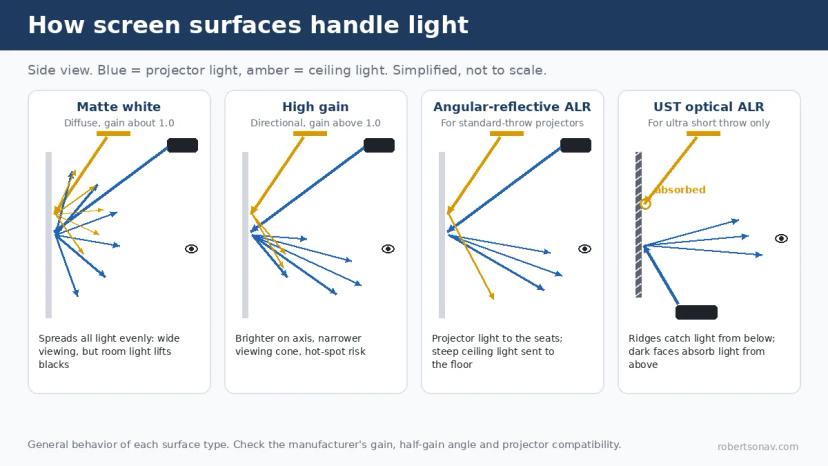
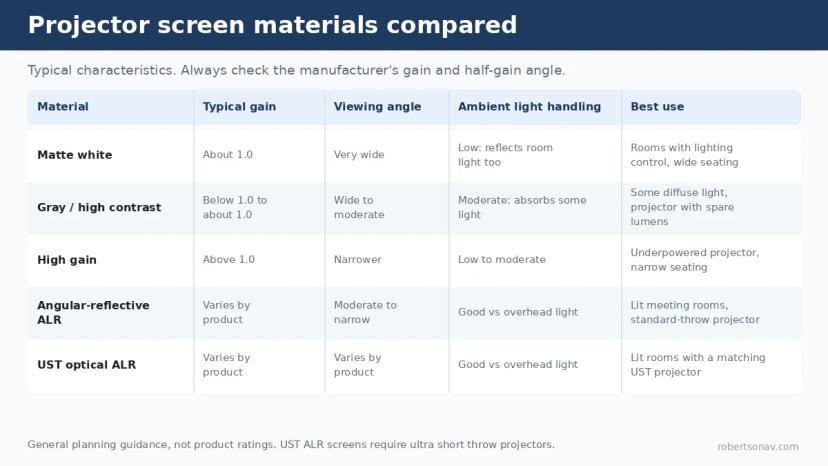
Matte white is a diffuse surface with a gain around 1.0. It spreads light evenly in every direction, so every seat sees nearly the same brightness, with no hot spots. The trade-off is that it treats room light exactly like projector light: ceiling, window and wall light all come back toward the audience and raise the black level.
It’s still right when the room can be dimmed, seating is wide, or the projector has ample headroom.
Gray and high-contrast surfaces
Gray pigment lowers gain: the screen absorbs part of everything that lands on it, projector light and room light alike. Da-Lite’s paper notes this makes black appear darker and improves the contrast the screen can produce. Whites dim too, so gray pays off when the projector has brightness to spare. Many “high contrast” materials combine gray pigment with some directionality to bring gain back toward 1.0 or above.
Ambient light rejecting screens
An ambient light rejecting screen is engineered to send projector light toward the audience while sending light from other angles toward the floor or ceiling, or absorbing it. There are two broad families.
Angular-reflective ALR for standard-throw projectors
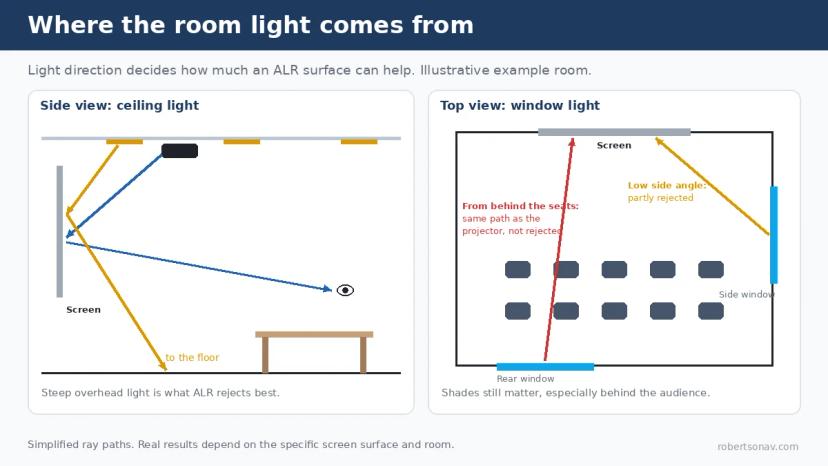
Angular-reflective surfaces behave a bit like a mirror: light leaves at an angle equal and opposite to the angle it arrived. Light from a projector mounted near the top of the screen bounces down and out to the seats. Light from ceiling fixtures arrives more steeply and is reflected toward the floor, away from viewers’ eyes. Mount the projector within the position range the screen manufacturer specifies, and check the half-gain angle, because viewing cones are typically narrower than matte white.
Optical and lenticular ALR for ultra short throw
UST ALR screens use a fine ridged or lenticular structure. Each ridge has a reflective face angled to catch light arriving steeply from below, where the UST projector sits, and send it out to the audience. The upper faces are dark and absorb light from above, such as ceiling fixtures.
That geometry is why UST ALR screens need UST projectors. A standard-throw projector’s light arrives from the front or above, hits the absorbing faces instead of the reflective ones, and the image comes out dim or uneven. Epson’s literature for its own UST ALR screens, for example, states that the ALR screen only works with ultra-short throw projectors. Match the two before ordering.
What ALR can’t do
ALR depends on direction. It works best against light from the angles it was designed to reject, typically overhead. Light from the audience’s direction, such as windows behind the seats, arrives along roughly the same path as projector light and can’t be separated from it. For strong daylight on the display wall, a flat panel is often the better tool; our commercial display vs consumer TV checklist covers that route.
Acoustically transparent screens, briefly
Perforated or woven acoustically transparent surfaces let speakers sit behind the screen so sound comes from the image. Some light passes through instead of reflecting, and fine patterns can interact with projected pixels at close seating distances. Confirm the material suits your resolution and nearest viewer, and allow extra brightness.
Matching lumens to the material
Screen brightness depends on projector lumens, image area and gain together. Our projector lumens guide by room size walks through the foot-lambert calculation, where the screen enters as the gain multiplier. As an illustration, moving from a 1.0 matte white to a 0.8 gray surface cuts on-axis brightness by a fifth for the same projector and image size. A lower-gain or ALR material often means stepping up a brightness class to keep whites bright.
Finalize image size with our screen size and seating distance guide and projector position with our throw distance guide before choosing a surface.
How to choose screen material for a bright room
- Map the light. Note fixtures, windows and reflective walls, and whether each can be dimmed or shaded.
- Fix what you can first. Shades and a dimmable lighting zone near the screen cost less than any special surface.
- Pick the projector type. UST or standard throw decides which ALR family is possible. Our classroom display planning guide compares UST projectors with flat panels.
- Check the seating spread. Wide classrooms and lobbies favor matte white or a wide-angle gray; narrow, deep conference rooms can use a more directional surface.
- Set brightness for the chosen gain. Run the foot-lambert check with the actual gain, leaving headroom for Eco mode and light source aging.
- Confirm the spec sheets. Gain, half-gain angle, projector compatibility and mounting position come from the screen manufacturer.
In practice, a conference room with overhead lighting and a ceiling-mounted projector often suits an angular-reflective ALR or high-contrast gray; a lit classroom with a UST projector suits a UST-specific ALR screen; a lobby with wide, moving viewers and strong daylight is often better served by a flat panel. For 4K projector options, see Epson 4K PRO-UHD projectors explained.
Get the room quoted
Send us the room details: dimensions, ceiling height, window and light fixture locations, seating layout, the projector you have or plan to use (UST or standard throw), and the image size you want. Our guide on how to request an AV quote that gets approved shows what to include. Shipping is free on all RobertsonAV orders within the United States, including oversized and heavy items. Some large items require a scheduled delivery, and the carrier will contact you to arrange a delivery window; if your site needs liftgate or inside delivery, mention it on your quote request. Orders shipped outside Florida aren’t charged sales tax; Florida orders are taxed unless the buyer submits a valid tax-exemption certificate, which tax-exempt buyers submit by logging in to their RobertsonAV account. Purchase orders are accepted against a formal quote, as explained in our guide to buying AV equipment with a purchase order. Net terms are available for eligible partners. Browse our projector screens and projectors, or send your room details through our quote request page.
FAQ
What is an ambient light rejecting screen?
A screen surface engineered to send projector light toward the audience while redirecting or absorbing light from other angles, usually overhead lighting, so blacks stay darker in a lit room.
Is a higher-gain screen always brighter?
Only on axis. Gain focuses light into a narrower cone, so off-axis seats see less and hot spots become more likely. Check the half-gain angle.
Can I use a UST ALR screen with a regular projector?
No. Its ridged surface is shaped for light arriving steeply from below. Light from a standard-throw projector hits the absorbing faces, giving a dim or uneven image.
Does an ALR screen work against windows?
Partly. It handles overhead light best. Light from behind the audience can’t be rejected, and strong daylight on the screen wall usually calls for shades or a flat panel.
Do I need more lumens with a gray or ALR screen?
Often, yes. Lower-gain surfaces reflect less light on axis, so plan for a brighter projector to keep whites bright.