
Robertson AV Guides
HDMI over HDBaseT: Running Video Long Distances
By Robertson AV ·

Most AV rooms put the source in one place and the display somewhere else. The laptop sits at a lectern, the media player lives in a rack, the projector hangs from the ceiling at the back of the room. HDMI cables are fine for short hops, but once the run crosses a large room, goes up through a ceiling or heads down a corridor, a standard cable gets unreliable. An HDBaseT extender is the usual fix. This guide explains when you need one, what it actually carries, and how to spec a pair that works the first time.
When an HDMI cable stops being enough
HDMI was designed to connect a source to a nearby display. How far a passive cable will reliably carry a signal depends on its construction, the bandwidth of the signal, and how well the display’s receiver handles a weak input. The higher the resolution and frame rate, the shorter the reliable run tends to be.
HDMI Licensing Administrator lists cable types by certified bandwidth: Premium High Speed HDMI Cables are certified for 4K/UltraHD at up to 18Gbps, and Ultra High Speed HDMI Cables support up to 48Gbps for formats like 8K@60 and 4K@120. Certification tells you a cable meets that bandwidth; it doesn’t turn a long passive run into a safe bet. The Premium HDMI Cable program also covers converter cables, including active optical cables.
Signs you have outgrown a plain HDMI cable:
- The run is longer than the cable maker’s rated length for your resolution.
- The cable has to go through walls, ceilings or conduit, where pulling a thick HDMI connector is awkward and replacing it later is expensive.
- You see sparkles, dropouts, a blank screen after the source wakes up, or a picture that works at 1080p but fails at 4K.
- You also need to send control, USB or network to the far end.
What HDBaseT is
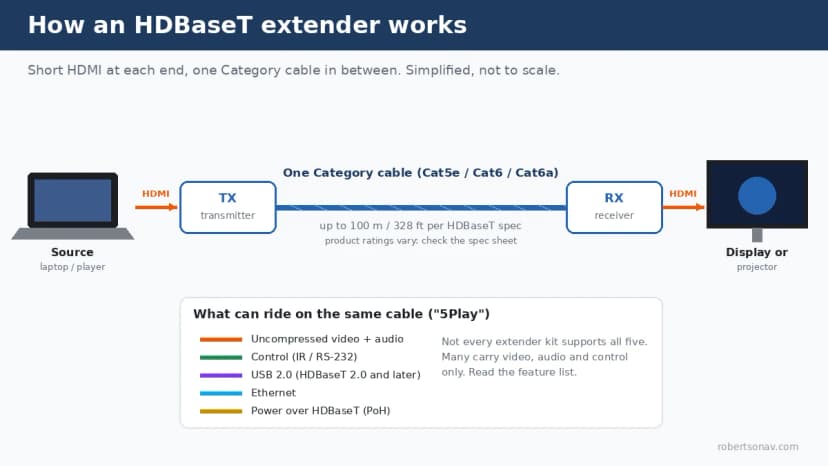
HDBaseT is a standard for sending uncompressed video and audio over ordinary Category (twisted-pair) cable. The HDBaseT Alliance describes it as long-range multimedia distribution technology that extends signals up to 100m/328ft over standard Category cable, point-to-point or daisy-chained.
A typical HDBaseT extender is a matched pair:
- Transmitter (TX): takes HDMI from the source and puts it onto a Category cable.
- Receiver (RX): at the display end, turns the Category signal back into HDMI.
The Alliance calls its feature set “5Play”: uncompressed ultra-high-definition audio and video, USB 2.0, Ethernet, control and power, all over a single Category cable. Not every extender supports all five. Many affordable kits carry video, audio and IR or RS-232 control only, so read the feature list rather than assuming.
HDBaseT versions and distance
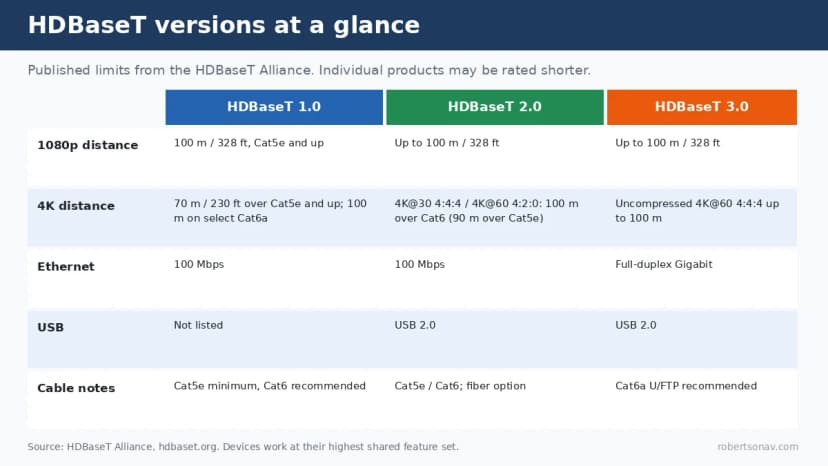
The Alliance’s published spec summaries give these limits:
- HDBaseT 1.0: 1080p up to 100m/328ft over Cat5e and up; 4K up to 70m/230ft over Cat5e and up (100m/328ft for select Cat6a). Supports 100 Mbps Ethernet and up to 100 watts of power.
- HDBaseT 2.0: 4K@30 4:4:4 and 4K@60 4:2:0 up to 100m/328ft over Cat6 (90m/295ft over Cat5e), adds USB 2.0, and supports optical fiber for longer distances.
- HDBaseT 3.0: fully uncompressed 4K@60 4:4:4 up to 100m/328ft, Gigabit Ethernet, and a recommendation of Category 6a U/FTP cable to get its full capability.
Two practical notes. First, those are the standard’s limits. A given product may be rated shorter, especially for 4K, so the extender’s spec sheet wins. Second, the Alliance says any two HDBaseT devices work at the highest feature set they share, so mixing a newer transmitter with an older receiver typically limits you to the older device’s capabilities.
What to buy: matching the extender to the job
Start with the signal
List the resolution, frame rate and color format the source will send, plus any HDR. A 1080p presentation laptop and a 4K@60 media player are different jobs. If the content is 4K@60 with full color, look for an extender rated for exactly that over your run length. For projector rooms, our Epson PowerLite 119W room planning checklist walks through input and placement decisions.
Measure the real cable path
Measure the route the cable will actually take, not the straight line across the room. Add up and over the ceiling, around doors and down to the rack, then leave slack for service loops. If the projector position isn’t settled yet, our guide to calculating projector throw distance helps you pin it down before you pull cable.
Decide what else needs to travel
- Power (PoH): many kits power the receiver from the transmitter, so you don’t need an outlet behind the display or above the ceiling. Check which end must be plugged in.
- Control: IR, RS-232 or Ethernet pass-through lets a control system or remote turn the display on and off from the rack.
- USB: needed if a room camera or touch display sits at the far end and the computer sits at the lectern. Our conference room camera buying guide covers USB versus HDMI cameras.
- Ethernet: handy when the far end needs a network drop and there’s only one cable path.
Choose the cable and terminations
Use solid-core Category cable rated for the distance and version you’re running, and terminate it carefully. The HDBaseT Alliance runs cable recommendation and Power over HDBaseT certification programs; PoH-certified cables are tested with UL Solutions for carrying 100W of power. Avoid running the extender cable through patch panels, couplers or network switches unless the extender maker says it’s supported, since every extra connection is a chance to lose signal. HDBaseT is a point-to-point link, not network traffic, so it doesn’t go through an Ethernet switch.
Think about the display end
Commercial displays often include RS-232 or LAN control and sometimes a built-in HDBaseT input, which can remove the receiver altogether. Our commercial display vs consumer TV checklist explains what to look for. Video walls and multi-screen lobbies add their own wiring questions, covered in our video wall planning guide.
When HDBaseT isn’t the right answer
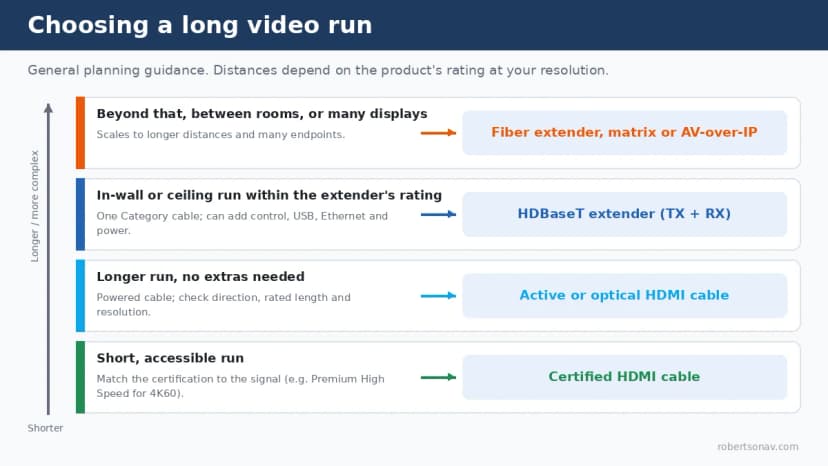
- Very long runs or between buildings: look at fiber extenders or HDBaseT products that support fiber.
- One source to many displays, or many-to-many routing: a matrix switcher with HDBaseT outputs, or AV-over-IP distribution on a dedicated network, scales better than a stack of separate extender kits.
- Short, accessible runs: a certified HDMI cable or an active optical HDMI cable is simpler and cheaper.
Installation checklist
- Confirm the extender’s rated distance at your exact resolution and frame rate.
- Pull and test the Category cable before ceilings close; label both ends.
- Keep HDMI patch cables at each end short and certified.
- Confirm which end gets power and where that outlet is.
- Test EDID/HDCP handshake with the real source and display, including wake from sleep.
- Document the cable path, extender model and control settings at handover.
Getting the right parts
Browse our extenders and Cat 5/6 cables, or send us the source, display, resolution and measured cable path through our quote request page and we’ll match a transmitter and receiver to the run. Our guide on how to request an AV quote that gets approved shows what to include. Shipping is free on all RobertsonAV orders within the United States, and purchase orders are accepted against a formal quote: email your PO to orders@robertsonav.com and reference your quote.
FAQ
What is an HDBaseT extender?
It’s a transmitter and receiver pair that converts HDMI to a signal that travels over a single Category cable and back to HDMI at the display. Depending on the model, it can also carry control, USB, Ethernet and power.
How far can HDBaseT send video?
The HDBaseT Alliance specifies up to 100m/328ft over Category cable, with 4K distance depending on the version and cable type. Individual products may be rated shorter, so check the spec sheet for your resolution.
Do I need Cat6a for HDBaseT?
Not always. Older versions run over Cat5e and up, with longer 4K distances on better cable. HDBaseT 3.0 recommends Category 6a U/FTP for its full capability.
Can I run HDBaseT through a network switch?
No. HDBaseT is a direct link between transmitter and receiver. If you need video over a network, look at AV-over-IP products instead.
Can I mix brands of transmitter and receiver?
The Alliance says HDBaseT devices from different makers work at their highest shared feature set. Integrators still usually buy matched kits so power, control and USB behave as documented.