
Robertson AV Guides
Commercial Display Sizes: 55 vs 65 vs 75 vs 86 Inch
By Robertson AV ·

“Will a 65 work in here?” is one of the most common questions we get on display quotes, and the honest answer is that it depends on two numbers: how far away the farthest seat is, and what people will be looking at. Size a conference room display by diagonal alone and you end up with a screen the back of the table can’t read, or one that overwhelms a small huddle room. This guide gives you the math for 55, 65, 75 and 86 inch commercial displays (plus 98 inch for deeper rooms), a quick sizing table, and the installation details that change the answer.
Start with the farthest seat, not the wall
Display sizing is about readability. The person in the farthest chair has to read the smallest text on a shared slide or spreadsheet without squinting. So the first measurement is the distance from the display wall to the eyes of the farthest seated viewer, not the width of the wall or the size of the room.
The second input is content. Video calls and full-screen video are forgiving. Slides with body text need more image. Detailed content such as spreadsheets, drawings, dashboards or code needs more again.
AV designers have long used the 4/6/8 rule of thumb, which ties the farthest viewer to image height:
- 4 × image height for detailed content viewers must inspect.
- 6 × image height for documents and presentation slides.
- 8 × image height for video and general viewing.
The industry standard today is AVIXA’s Display Image Size for 2D Content in Audiovisual Systems (ANSI/AVIXA V202.01, known as DISCAS), which sizes the image from the smallest element viewers must see. AVIXA explains the closest and farthest viewer terms and offers DISCAS calculators for designers. For typical slides the 6× rule lands close to the standard, as our projector screen size and seating distance guide shows.
55 vs 65 vs 75 vs 86 inch: the sizing table
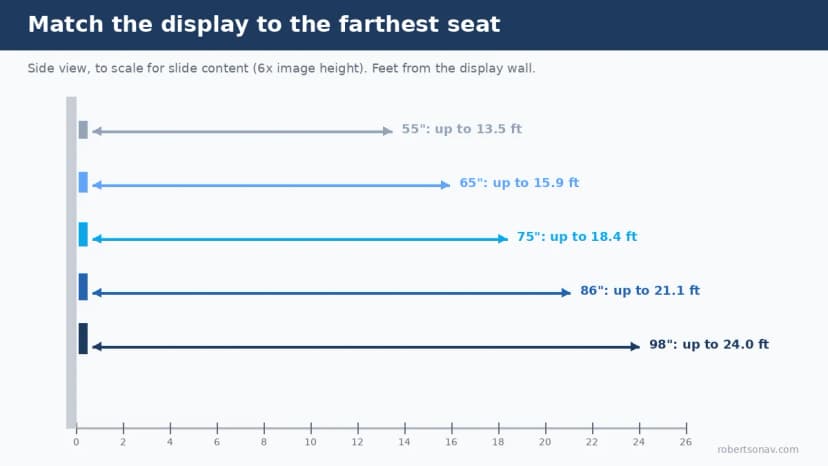
A 16:9 image is about 0.49 times its diagonal tall and about 0.87 times its diagonal wide. Multiply the height by the rule factor and you get the maximum distance for the farthest seat.

| Size (16:9) | Image height × width | Farthest seat, detail (4×) | Farthest seat, slides (6×) | Farthest seat, video (8×) |
|---|---|---|---|---|
| 55″ | about 27″ × 48″ | about 9 ft | about 13.5 ft | about 18 ft |
| 65″ | about 32″ × 57″ | about 10.5 ft | about 16 ft | about 21 ft |
| 75″ | about 37″ × 65″ | about 12 ft | about 18.5 ft | about 24.5 ft |
| 86″ | about 42″ × 75″ | about 14 ft | about 21 ft | about 28 ft |
| 98″ | about 48″ × 85″ | about 16 ft | about 24 ft | about 32 ft |
These figures use the nominal diagonal. The viewable area on a spec sheet is often slightly smaller, so check it when a room sits right on the line.
To work it backward: take the farthest seat in inches, divide by 6 for slides, then divide by 0.49 for the 16:9 diagonal. A farthest seat at 17 feet (204 inches) gives a 34-inch image height and roughly a 69-inch diagonal, so a 75 is the right call and a 65 would come up short.
Which size fits which room
These are typical starting points. Your own furniture plan and content always win.
55 inch: small huddle rooms and offices. Two to four seats around a small table with the farthest chair within about 13 feet works well for slides. Our huddle room AV setup checklist covers the camera, mic and BYOD pieces that go with it.
65 inch: the default small conference room. Rooms with a table for six or so, where the far end sits around 14 to 16 feet away, fit a 65 for slide sharing.
75 inch: medium conference rooms and many classrooms. A 75 covers a farthest seat up to about 18 feet for slides.
86 inch: larger conference rooms, training rooms and classrooms. Up to about 21 feet for slides. In deeper rooms where text is the priority, an 86 can still come up short at the back, and that’s the point to compare a 98, two displays, or projection. If you’re weighing a flat panel against projection for a classroom, see our ultra short throw vs flat panel guide.
98 inch and beyond. Rooms past about 21 feet for slides push into 98-inch panels, large projection screens or a video wall.
When two displays beat one bigger display
Video conferencing rooms often run two displays: one for the people on the call and one for shared content. Microsoft’s Teams Rooms planning guidance recommends dual front-of-room displays for medium or large rooms, with one showing the meeting gallery and the other showing shared content. Two 65s or two 75s keep both the faces and the slides large enough, where one display forces content into a smaller window.
Check that your room system and camera support a dual-display layout before you order. Our conference room camera buying guide and the conferencing video bars category are good places to compare.
Check the nearest seat and mount height
Bigger isn’t free of trade-offs. People sitting too close to a large display have to tilt their heads to see the top of the image. In the DISCAS method, the closest viewer is set by a viewing angle to the top of the image. With the bottom of the image near seated eye level, that works out to roughly 1.7 times the image height, or about 4 feet for a 55 and about 6 feet for an 86. Mount the display higher and the nearest comfortable seat moves back.
In a conference room, the display usually sits just above the credenza or table line so seated viewers can see the bottom edge over the table. In a classroom or training room with several rows, the bottom of the image has to clear the heads in front, which pushes the display up and the front row back.
Installation details that change the answer
Wall structure and mount rating. Confirm what’s behind the drywall and that the mount is rated for the display’s weight and VESA hole pattern, which are listed on the display’s spec sheet. Browse flat wall mounts for fixed installs and full-motion wall mounts where the screen needs to angle toward seating.
Power, data and source cabling. Plan a recessed box behind the display for power and low-voltage cable so the mount sits flush. If the source is at the far end of the table or in a rack, our HDBaseT extender guide explains when an HDMI cable won’t reach.
Commercial vs consumer panels. Commercial displays are built for long daily runtimes and include control and warranty terms that suit business use. Our commercial display vs consumer TV checklist covers what to compare. Shop commercial displays or interactive touch displays if the room needs annotation. Touch displays are used up close, so make sure the person at the board can reach the top of the screen at your mount height.
Delivery access. Check the elevator, door widths and the path to the room for 86 and 98 inch boxes. Some items require a scheduled delivery, and the carrier will contact you to arrange a delivery window. If you need liftgate or inside delivery, mention it on your quote request.

Ordering displays for one room or many
For multi-room projects, measure each room type once (huddle, small conference, large conference, classroom) and standardize a size per type. Send us the room list with farthest-seat distances, content type, wall construction and mount style through our quote request page, and see how to request an AV quote that gets approved for what to include.
Shipping is free on all RobertsonAV orders within the United States, including oversized and heavy items. Organizations can buy with a purchase order against a formal quote: email the PO to orders@robertsonav.com and reference your quote. Net terms are available for eligible partners. Orders shipped outside Florida aren’t charged sales tax, and tax-exempt Florida buyers can submit their exemption certificate by logging in to their RobertsonAV account.
FAQ
What size display do I need for a conference room?
Measure from the display to the farthest seat, divide by 6 to get the minimum image height for slides, then divide by 0.49 for the 16:9 diagonal. A farthest seat at 16 feet points to about a 65, at 18 feet a 75, and at 21 feet an 86.
Is a 65 or 75 inch display better for a conference room?
For a farthest seat up to about 16 feet, a 65 handles slides. Between about 16 and 18.5 feet, choose a 75. If the room is mostly video calls rather than shared documents, the smaller size reaches further.
When should I choose an 86 inch display?
When the farthest seat is roughly 18.5 to 21 feet away for slide content, or when the room shows detailed content at a shorter distance. Past about 21 feet for slides, consider a 98, dual displays or projection.
Are two displays better than one large display?
In video conferencing rooms, often yes. Microsoft recommends dual front-of-room displays for medium or large Teams Rooms, with one screen for participants and one for content. Confirm your room system supports it first.
How high should a conference room display be mounted?
High enough that seated viewers see the bottom edge over the table, but not so high that the nearest viewers strain to see the top. In multi-row rooms, raise the image to clear the heads in front.