
Robertson AV Guides
Epson Business Projector Lineup Compared
By Robertson AV ·

Epson's business projectors are easier to buy when you start from the room, not from a model number. A classroom lamp projector, a lamp-free classroom laser, a large-venue installation laser and an ultra-short-throw interactive unit are all sold under familiar PowerLite and BrightLink names, but they are built for different throws, brightness bands and teaching styles. This guide maps current, published Epson families to room types and cites specifications only from Epson's own pages and manuals. It is a planning comparison, not a catalog of every SKU.
For a worked classroom example, see the Epson PowerLite 119W room planning checklist. For brightness by room size, start with the projector lumens guide. Lamp versus laser cost of ownership is covered separately in laser vs lamp projectors: total cost of ownership. Home and cinema models are covered in Epson 4K PRO-UHD projectors explained and are not the focus here.
Match the family to the room, then confirm the throw
A huddle room, a standard classroom, a training room with daylight and a lecture hall do not take the same lumen band or the same lens. Use the lumens guide for a starting range, then confirm image size and lens placement with how to calculate projector throw distance and the screen size and seating distance guide. Standard-throw, short-throw and ultra-short-throw are different products. Mounting follows that choice; see projector mounts: ceiling, wall, and short-throw arms.
Classroom and meeting rooms: the lamp PowerLite family
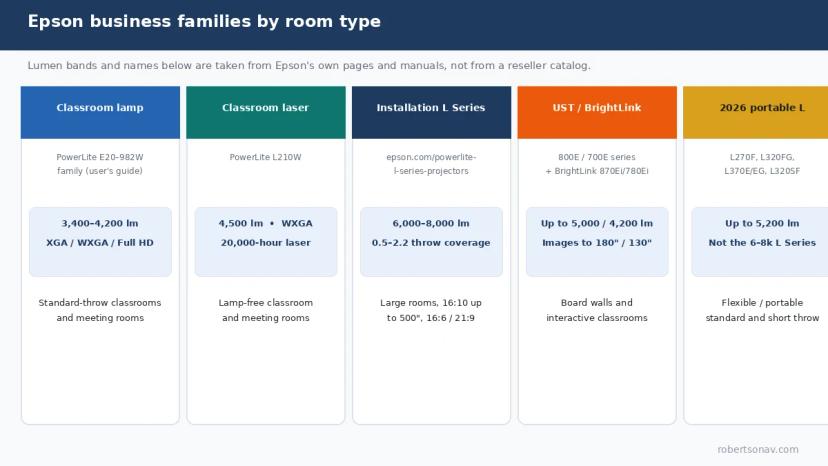
Epson's current classroom lamp group is documented together in the PowerLite E20/X49/W49/118/119W/982W/992F/1288 user's guide. Color and white brightness, measured per Epson's standard footnotes (IDMS 15.4 for color, ISO 21118 for white), are listed as follows:
| Model | Native resolution | Color and white brightness |
|---|---|---|
| PowerLite E20 | XGA (1024 × 768) | Up to 3,400 lumens |
| PowerLite X49 | XGA (1024 × 768) | Up to 3,600 lumens |
| PowerLite W49 / 118 | W49: WXGA (1280 × 800); 118: XGA | Up to 3,800 lumens |
| PowerLite 119W / 992F / 1288 | 119W: WXGA; 992F and 1288: Full HD (1920 × 1080) | Up to 4,000 lumens |
| PowerLite 982W | WXGA (1280 × 800) | Up to 4,200 lumens |
The PowerLite 119W product page adds the details most classrooms ask about: native WXGA at 16:10, a 1.30–1.56 throw ratio, image size from 33" to 320", a 16 W speaker, dual HDMI, LAN and RS-232, and lamp life up to 17,000 hours in ECO mode, 10,000 hours in medium and 8,000 hours in normal. That is a solid mid-band classroom and training-room starting point when a lamp projector is acceptable and the room can take a standard ceiling mount. Maintenance still follows a lamp schedule; see projector maintenance: filters, lamps, and cleaning.
Classroom laser: PowerLite L210W
When a school wants lamp-free operation in the same classroom band, Epson's PowerLite L210W page specifies 4,500 lumens of color and white brightness, WXGA resolution, a solid-state laser light source listed at 20,000 hours of virtually maintenance-free use, an image up to 300" diagonal, 1.6x optical zoom, two HDMI ports, a 16 W speaker and built-in wireless with casting, including connection from up to 50 devices through Epson iProjection (with the usual network and app notes on that page). It is a classroom and meeting-room laser, not the higher-lumen installation L Series described next.
Larger rooms: the PowerLite L Series installation family
Epson's PowerLite L Series page (the installation family at epson.com/powerlite-l-series-projectors) describes a different band: 6,000 to 8,000 lumens of equal color and white brightness, throw-ratio coverage from 0.5 to 2.2 across the models in the family, images up to 500" diagonal in 16:10 plus ultra-wide 16:6 and 21:9, 360-degree mounting, wide lens shift, and a laser light source and filter listed at up to 30,000 hours in Extended Mode (20,000 hours in Normal Mode), with Epson's standard brightness-life footnotes. Selected models include 4K Enhancement, which Epson defines as a technology that shifts each pixel to surpass Full HD resolution on screen. This is the family to evaluate for large classrooms, training theaters, houses of worship and other rooms that need more light or a more flexible lens than a 4,000-lumen classroom chassis.
For lecture-hall scale, pair this family with lecture hall AV design: projection, audio, and capture rather than stretching a classroom lamp model.
Ultra-short-throw, interactive, and the 2026 portable L models
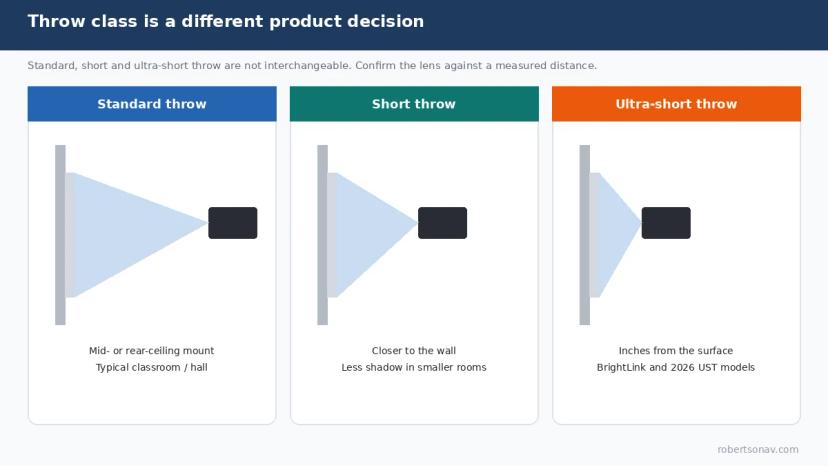
If the room cannot accept a mid-ceiling projector, or if teachers will write on the image, look at ultra-short-throw and BrightLink. The choice between a UST image and a flat panel is covered in classroom display planning: ultra short throw vs flat panel.
On May 19, 2026, Epson announced ten new PowerLite and BrightLink laser models. All are described as under 20 pounds, with brightness levels under 6,000 lumens. The official announcement gives these published figures:
- Ultra-short-throw brightness: up to 5,000 lumens on the 800E-Series and 4,200 lumens on the 700E-Series, color and white.
- BrightLink 870Ei and 780Ei: UST interactive models with 4K Enhancement, images up to 130", a 30,000-hour laser light source, annotation tools, a rechargeable interactive pen, and touch functionality. Epson notes that the finger-touch module is included only with the 870Ei and is optional on the 780Ei.
- PowerLite 870E, 875E and 780E: UST projectors with 4K Enhancement, images up to 180", 16:9, 16:6 and 21:9, 360-degree installation, edge blending and split screen.
- Portable standard- and short-throw models: PowerLite L370EG and L370E (4K Enhancement, standard throw), L270F and L320FG (Full HD, standard throw), and L320SF (Full HD, short throw). Epson lists up to 5,200 lumens of equal color and white brightness, images up to nearly 500", 1.6x optical zoom, two HDMI inputs, a 16 W speaker and a 30,000-hour laser light source.
Epson lists availability as summer 2026 for the PowerLite L270F, 780E, 870E, 875E and BrightLink 780Ei; fall 2026 for the PowerLite L370EG, L320FG, L320SF and BrightLink 870Ei; and late 2026 for the PowerLite L370E. Confirm current availability when you request a quote. These portable L model names are not the same family as the 6,000–8,000-lumen PowerLite L Series installation projectors above; use the published lumen band and throw class, not the letter L alone, to tell them apart.
A practical way to choose
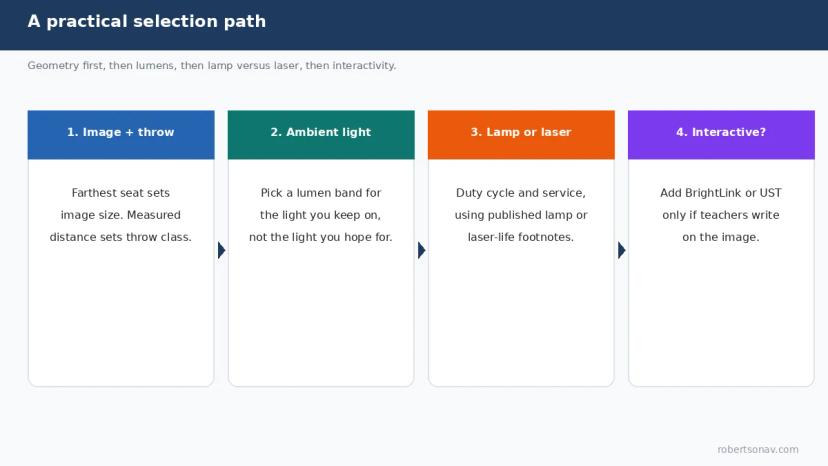
- Fix image size from the farthest seat, then the throw class the room can accept.
- Pick a lumen band for the ambient light you actually have, not the light you hope for.
- Choose lamp versus laser using duty cycle and the total-cost guide, not the brochure word "maintenance-free" alone. Epson's laser-life figures are approximate times until brightness decreases 50% from first use, under stated test conditions; other parts may need service sooner.
- Add interactivity only if teachers will write on the image. Otherwise a standard PowerLite is simpler.
- For cinema-quality 4K at home or in a dedicated theater, use the 4K PRO-UHD guide rather than a classroom chassis.
Browse projectors and screens once geometry and lumen band are set, or send the room dimensions through a quote request.
FAQ
Is the PowerLite 119W still a reasonable classroom starting point?
Yes, when a 4,000-lumen WXGA lamp projector matches the room. Epson's product page lists 4,000 lumens of color and white brightness, a 1.30–1.56 throw ratio and up to 17,000-hour lamp life in ECO mode. Work the room in the 119W planning checklist before you standardize on it.
What is the difference between PowerLite L210W and the PowerLite L Series?
The L210W is a 4,500-lumen WXGA classroom laser with a 20,000-hour light-source rating. The installation PowerLite L Series is specified at 6,000 to 8,000 lumens, with broader throw coverage and a 30,000-hour Extended Mode rating. They share a letter, not a lumen band.
What does Epson mean by 4K Enhancement?
Epson's published definition is that 4K Enhancement Technology shifts each pixel to surpass Full HD resolution on screen. For how that compares with native 4K, see native 4K vs pixel-shift 4K.
When should we use BrightLink instead of a flat panel?
When you need a larger interactive image than a single panel can provide, or when a board wall is already the right surface. Compare that path in the UST versus flat panel guide.
Are the May 2026 models shipping now?
Epson's announcement dated May 19, 2026, lists summer, fall and late-2026 availability by model. Ask for current availability on the quote. Do not assume every announced model is in stock.
Can RobertsonAV quote Epson business projectors for a specific room?
Yes. Send room dimensions, ceiling height, desired image size, ambient light notes and whether you need interactivity through a quote request. Shipping is free on all RobertsonAV orders within the United States, including oversized and heavy items. Some items need a scheduled delivery, and the carrier will contact you to arrange a delivery window. If you need liftgate or inside delivery, mention it on your quote request. Orders outside Florida have no sales tax; Florida orders are taxed unless you submit a tax-exemption certificate by logging into your RobertsonAV account. Net terms are available for eligible partners. Purchase orders are accepted against a formal quote and should be emailed to orders@robertsonav.com with a reference to your quote.